You're tired. Maybe it's the constant noise, the arguments in the comments, the pressure of knowing your feed is engineered to keep you scrolling. Or maybe something more personal happened: your account got hacked, your privacy felt violated, or you simply realized Facebook no longer fits the life you're living.
Whatever brought you here, you're not the first. A 2023 Pew Research study found that roughly 3 in 10 US adults say they barely use Facebook, and a significant portion are either deactivating or deleting their accounts entirely. But knowing you want to leave and knowing how to actually do it cleanly, correctly, and without accidentally locking yourself out are two different things.
This guide covers both. You'll learn exactly how to deactivate Facebook across every major device, how permanent deletion works, and how to make the right choice for your situation before you do anything irreversible.
This is the step most people skip, and it's the one that matters most.
Deactivation is like putting your account on pause. The moment you deactivate, your profile disappears from Facebook entirely. Nobody can search for you, visit your profile, or tag you. Your posts, photos, messages, and friend list are all preserved in the background. When you're ready to come back, whether that's in a week or two years, logging in restores everything automatically.
Deletion is permanent. Once you confirm it, Facebook begins a 30-day countdown. During those 30 days, you can cancel by simply logging back in. But once that window closes, your account, content, and data are scheduled for full removal. Facebook's servers may retain certain backup data for up to 90 days, but your profile becomes inaccessible to others from the moment the grace period ends.
According to Meta's own data deletion policy, some information, like records of messages sent to others, may persist even after an account is fully deleted, because it exists in the recipient's account rather than yours.
Bottom line: if there's any part of you that might want your account back, start with deactivation. You can always delete later. You can't undo a deletion.
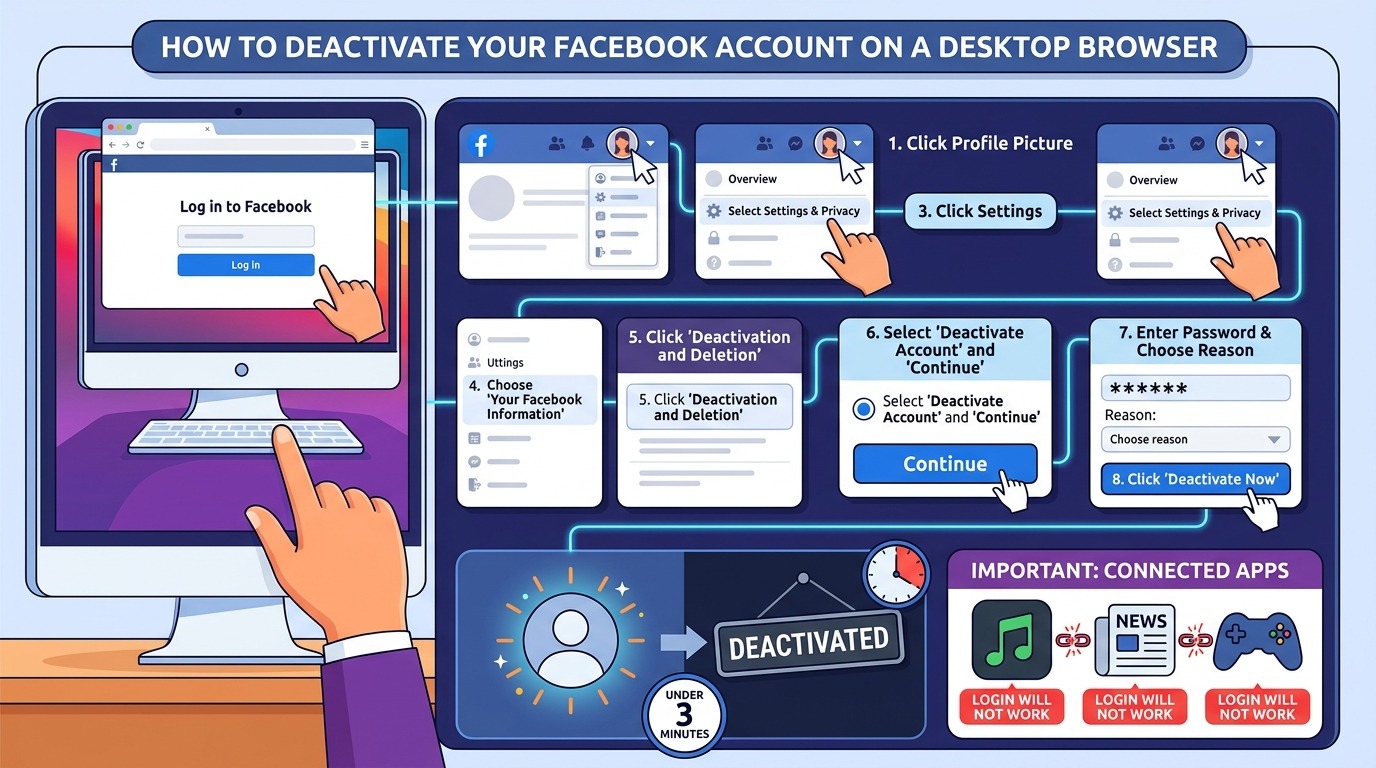
For most people, the desktop version is the clearest path through Facebook's settings maze. Here's the step-by-step:
The whole process takes under three minutes. Your account goes dark immediately, no waiting period, no confirmation email. You'll be logged out automatically.
Before you finish: Facebook will show you a list of apps you've connected using your Facebook login. Things like Spotify, news platforms, or games. Once your account is deactivated, those third-party logins may not work. Make sure you have alternate login credentials set up for anything you use regularly.
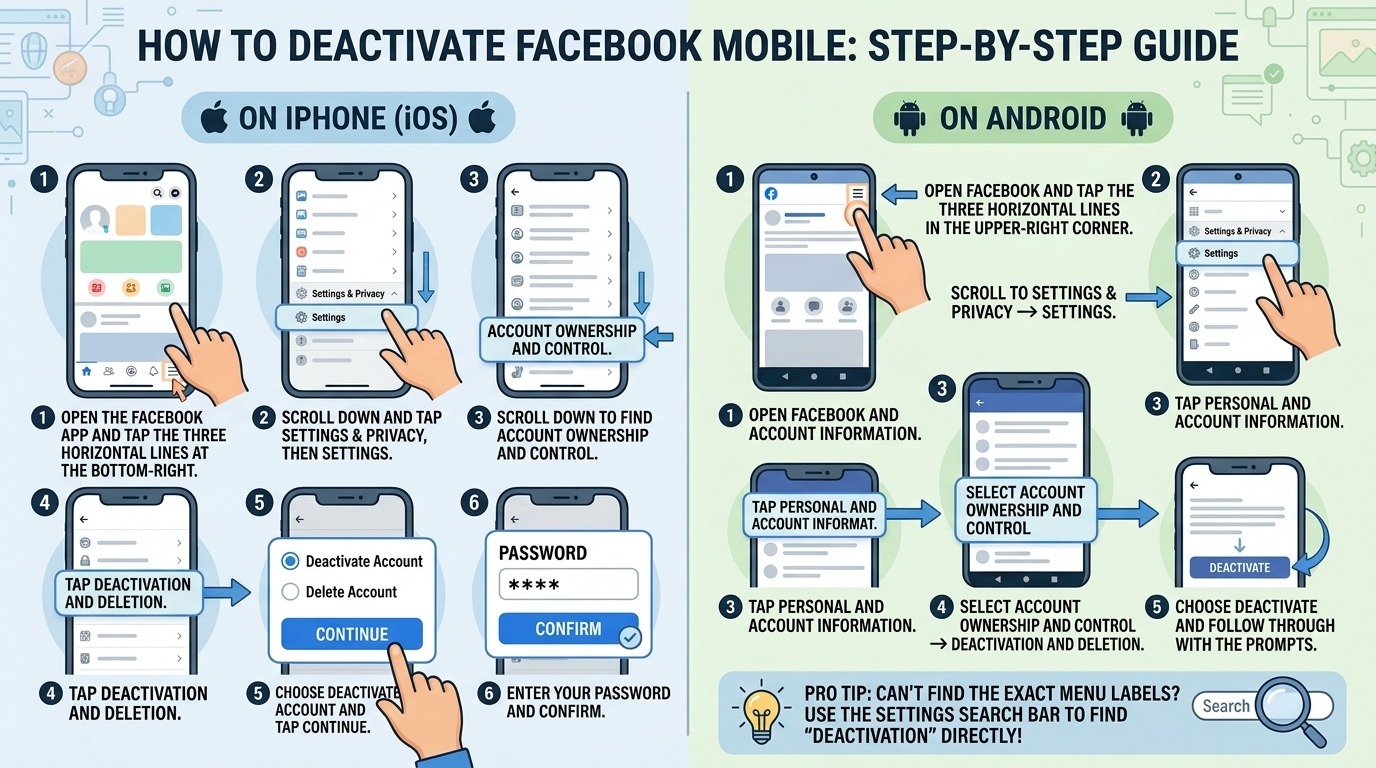
If you're doing this from your phone, the navigation is slightly different — and Facebook's app menus shift often enough that it helps to know exactly where to look. Here's how to deactivate Facebook mobile on both major platforms.
If you don't see these exact menu labels, search for "deactivation" in the Facebook settings search bar it surfaces the right page directly, regardless of how the interface has been updated.
This is the most common question; once people understand their options, the answer is straightforward. Temporary deactivation preserves 100% of your data. Photos, posts, videos, messages, friend connections all of it hibernates and waits for you. There's no time limit on how long you can stay deactivated, and there's no formal process to reactivate. You just log back in.
A few things to keep in mind during a temporary suspension:
A lot of people don't realize that a Facebook Page, for a business, a brand, a creative project, is a completely separate entity from your personal profile. Knowing how to deactivate my Facebook page requires a different set of steps than managing my personal account.
An unpublished page is invisible to the public and won't appear in search results, but you and any other page admins can still access it through the backend. You can republish at any time without any loss of content, followers, or insights data.
Pages have a shorter 14-day grace period compared to personal accounts. After those 14 days, the page and all associated content posts, reviews, photos, and follower count are permanently gone.
One important note: only the primary admin of a page can delete it. If you've lost admin access due to a compromise or an ownership dispute, that's a situation that goes beyond standard settings navigation. Professional social media support services can help you work through complex access and ownership issues before you lose the page permanently.
If you've made peace with the decision and you're ready to make it final, here's how permanent deletion works.
Step 1: Download your data first. Go to Settings → Your Facebook Information → Download Your Information. Select the date range, format, and content types you want. Facebook will prepare a file and email you a download link. This can take anywhere from a few minutes to a few hours, depending on how much you have stored.
Step 2: Navigate to Deactivation and Deletion using the same path described in the desktop or mobile sections above, but this time select Delete Account instead of Deactivate.
Step 3: Review what you're losing. Facebook will show you exactly what will be deleted and remind you of the 30-day window.
Step 4: Confirm. Click Delete Account and enter your password one final time.
From that point forward, the 30-day clock starts. Don't log in, not even by accident, through a connected app, or the process resets automatically.
This happens more often than people expect. You go to take control of your account and realize you've been locked out due to a wrong password, a changed phone number, a lost two-factor authentication device, or an account that's been flagged or disabled by Facebook's automated systems.
The problem is that every path through Facebook's settings, including deactivation and deletion, requires you to be logged in. If you can't get in, you can't manage anything.
Facebook does offer official account recovery tools through its Help Center, but these can be slow, inconsistent, and in some cases completely unresponsive to older accounts or unusual access situations. If you've gone through those steps without resolution, working with a team that specializes in helping people recover my Facebook account through proper channels can save you a significant amount of time and frustration.
What actually happens to my Facebook account when I deactivate it?
When you deactivate, your profile is immediately hidden from all public view; no one can search for you, tag you, or visit your page. All your content (photos, posts, friends list) stays stored on Facebook's servers in a dormant state. Logging back in at any time, even years later, fully restores your account exactly as it was.
How do I deactivate my Facebook account on my phone without deleting it? Open the Facebook app, go to the hamburger menu, then Settings & Privacy → Settings → Account Ownership and Control → Deactivation and Deletion. Select "Deactivate Account" and follow the prompts. This hides your profile and preserves all your data without permanently removing anything.
Can I keep using Messenger if I deactivate my Facebook account?
Yes: Facebook allows you to stay active on Messenger even after deactivating your main profile. During the deactivation process, you'll see a specific checkbox asking whether you want to keep Messenger active. Leave it checked, and your Messenger chats and contacts will remain accessible even while your profile is hidden.
How long does it take for Facebook to fully delete an account after I request it? After submitting a deletion request, there's a 30-day cancellation window. If you don't log in during that period, Facebook begins removing your data from active systems. Full removal from backup servers can take up to 90 days, though your profile and content become inaccessible to others as soon as the 30-day window closes.
Will deleting my Facebook account also delete my Instagram or WhatsApp?
No. Although Facebook, Instagram, and WhatsApp are all owned by Meta, they operate as separate accounts and services. Deleting your Facebook account has no effect on your Instagram or WhatsApp accounts. You would need to separately manage or delete each one through their respective platforms.
Taking control of your Facebook presence, whether you're stepping back temporarily or walking away for good, is entirely in your hands. Understanding how to deactivate Facebook versus deleting it is the foundation. Knowing the right steps for your device and account type is what gets you across the finish line without any surprises.
Deactivate if you want flexibility. Delete if you want finality. Download your data before either. And if you hit a wall accessing your account along the way, don't force it; get the right support before something becomes unrecoverable.
Your digital space should work for you. If it's not, today's a fine day to change that.
.avif)



.avif)


.jpg)
.png)
.png)
.png)