Have you ever attempted to log in to an application, share your profile, or recover your account, only to realize that you do not know your Facebook username? You’re not alone. Most users mistake their display name or email for their username, and this may cause frustration when using some of the features.
In case you have been wondering how to find your Facebook username, this article will take you through each and every step. You will know where to find it, whether it’s on a mobile phone or a desktop, what your username is, and how to use it appropriately. You will understand it clearly without any guesses at the end.
A Facebook username is a distinguishing characteristic of your profile. It tends to be visible in your profile URL (such as facebook.com/yourusername). It is unique, like your name, and easily identifiable to others.
Usernames are commonly used in:
When you are searching for how to find my Facebook username, you probably require it in one of these circumstances.
It is easy to locate your username on mobile devices, provided you know where to find it.
This is the easiest way to understand how to see your facebook username directly from your phone.
You can also:
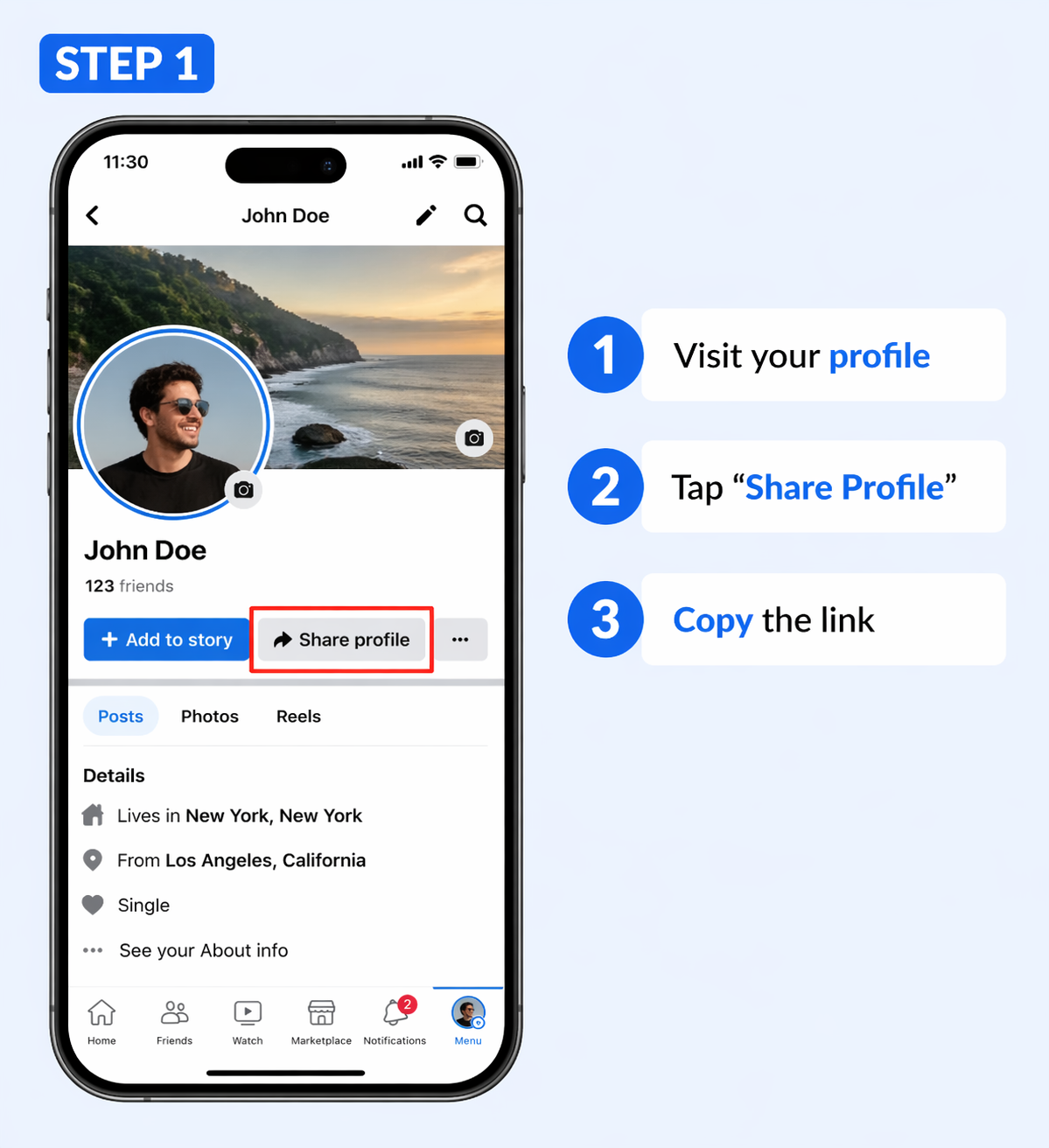
Your username will appear at the end of the URL.
If you’re using a laptop or PC, the process is even quicker.
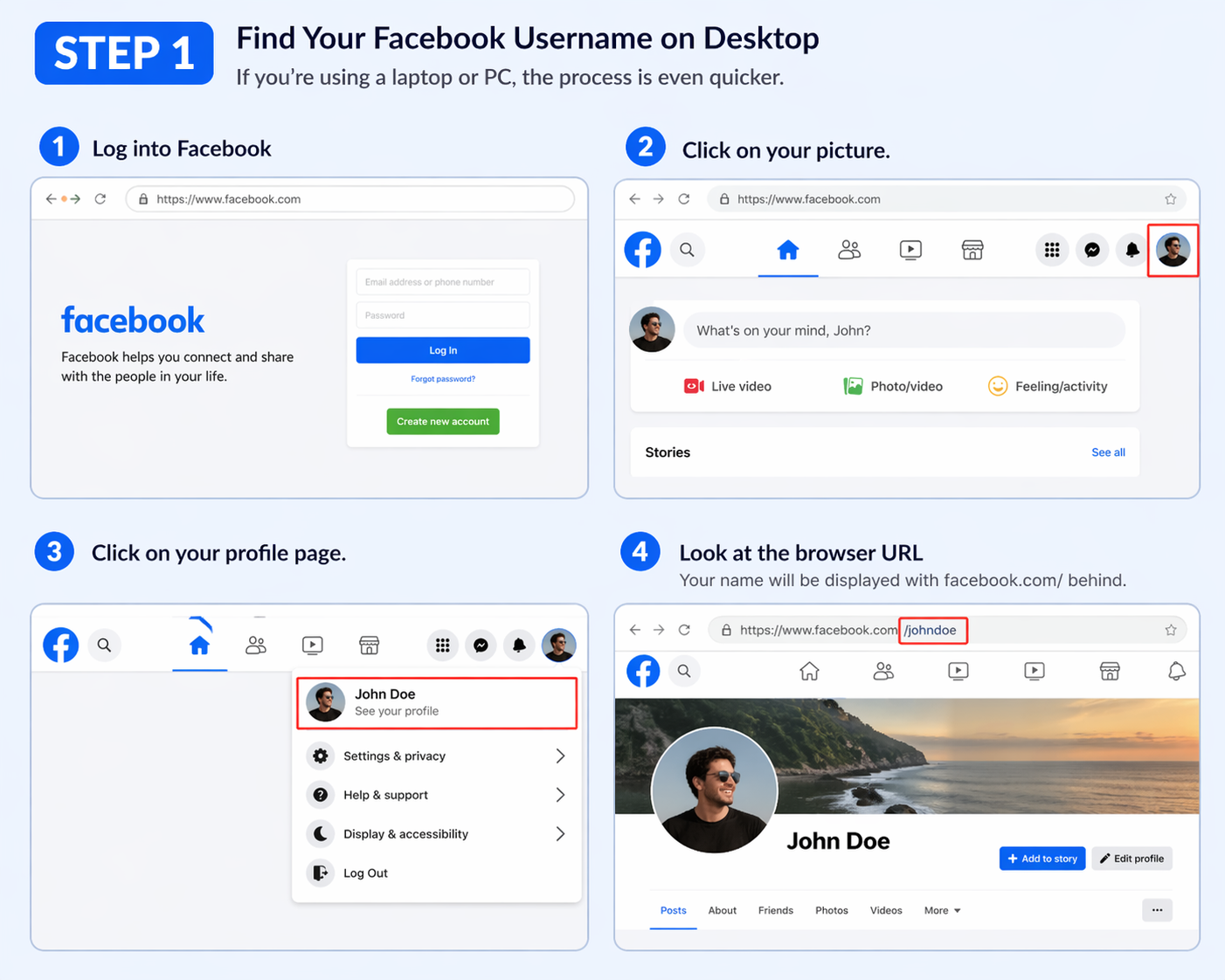
Your name will be displayed with facebook.com/ behind.
It is among the easiest methods through which one can get to know how to find a facebook username without searching through settings.
You can also:
This ensures accuracy if your profile link is customized.
In some cases, users have trouble due to:
In case this occurs, you might have to engage Social media support services to troubleshoot matters related to accounts effectively.
If you don’t have a username yet, you can create one.
Experts recommend using consistent usernames across platforms to improve discoverability and branding.
Your username plays a key role in:
According to a study conducted by Statista, Facebook has more than 3 billion users in the world today, and usernames have become a significant identity attribute in online communications.
In case you lose access to your account, your username will help to recover it faster. Services like the Facebook recovery service by Social Rescue can help to restore access in a safe manner in such cases.
When learning how to find your facebook username, most users commit the following errors:
Avoiding these errors can save time and frustration.
Check the URL on your browser or app, go to your profile. The name of the page is followed by facebook.com/ your username. This is the quickest method of finding it.
No, your username is unique and this is used in your profile link, and your name is your display name. They may be different.
Yes, it is possible to change it in your account settings. Nevertheless, there are Facebook regulations, and frequent changes can be limited.
In other words, you might have to create one in settings in case you do not see one. There are those who make use of default IDs rather than usernames.
It assists in recovering your account, sharing your profile, and logging in to apps. It also enhances your online presence.
It is not necessary to find your Facebook username confusing. The process is easy, whether you are on mobile or desktop, as long as you know where to find it. So, when you know how to find your Facebook username, you can always find it whenever needed.
Check your username today, and save it somewhere safe to ensure that it matches your identity, whether personal or professional. Such little measures will make controlling your online presence much easier.
.avif)



.avif)


.png)
.png)
.png)
.png)