Altering your business name is a significant step, but when does this become a major one? There are many reasons you can consider, for example, rebranding your company or expanding into new markets. For any of these reasons, if you’ve been searching for how to change business name on Facebook, you’re not the only one behind it. Business owners are sometimes subject to confusion, delays, and even rejections when attempting to change their page name.
The good news? Facebook does allow updates, provided you do the right things and avoid the big pitfalls. In this guide, we’ll outline everything you need to know about how to change business page name on Facebook: how to update it, what rules you should follow and the way to get approved quickly. When you’re finished, you’ll feel ready to make a seamless business name change on Facebook without putting your page at risk.
If you're looking for, can I change my business name on Facebook? Follow these steps:
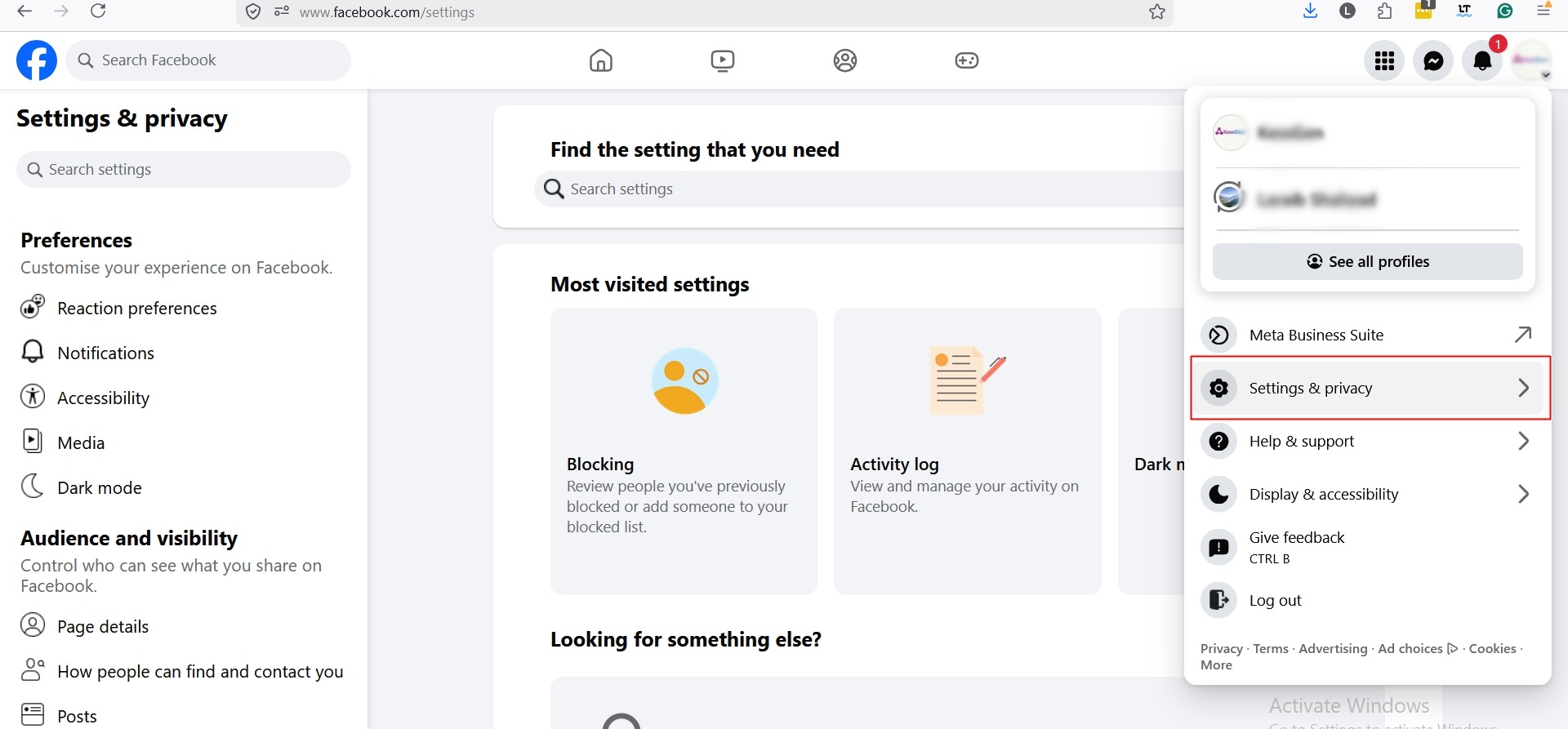
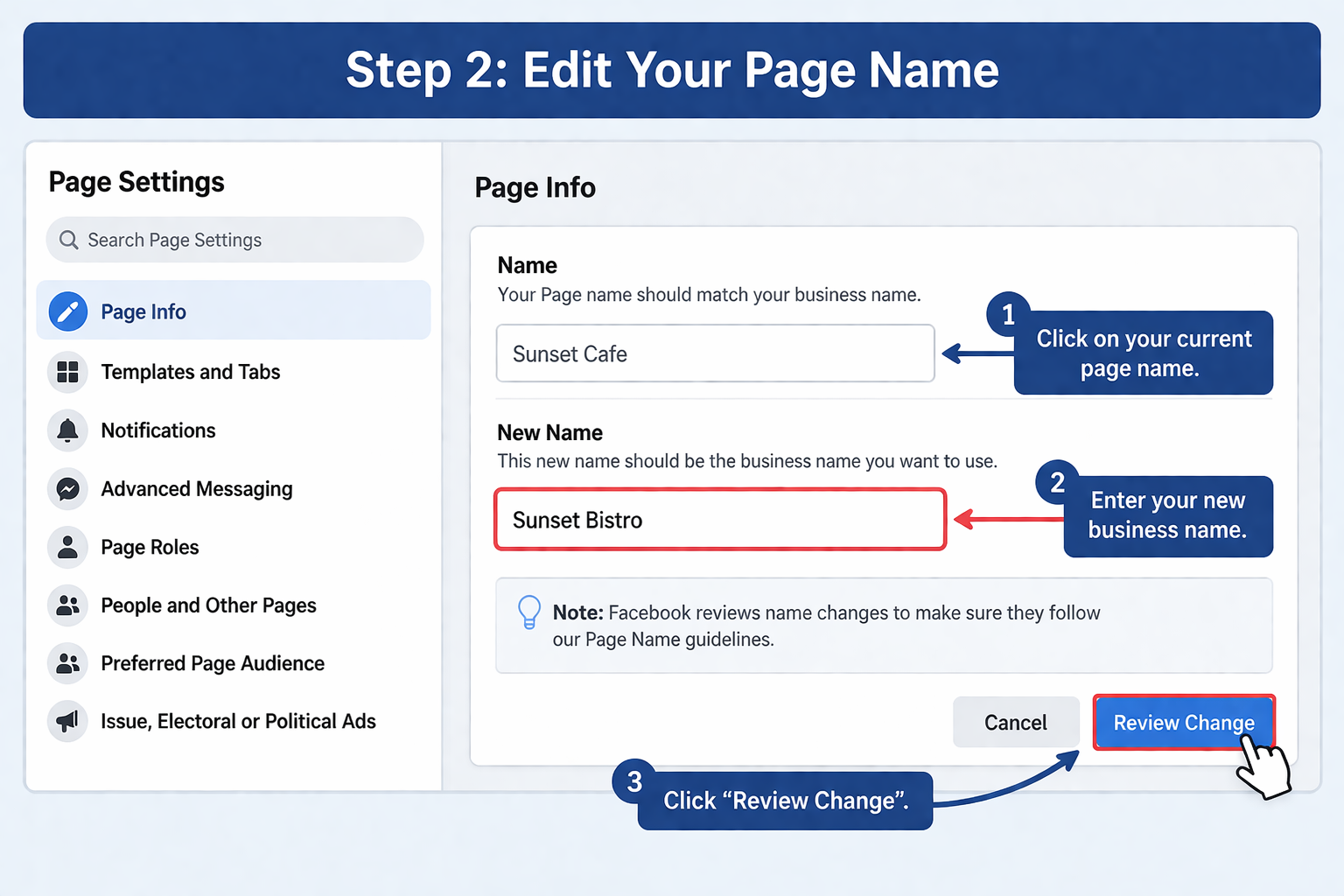
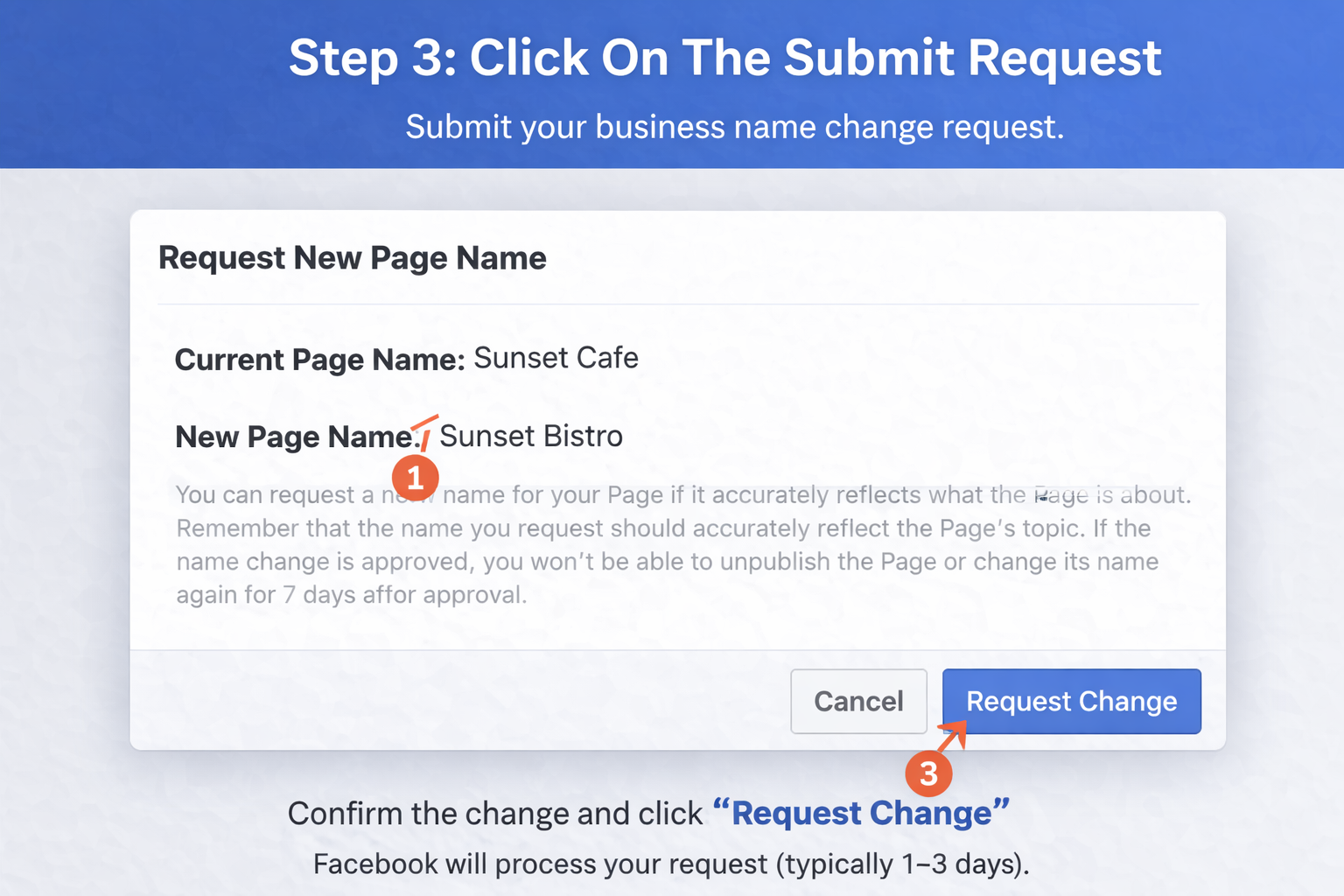
Within a timeframe of 1-3 days, Facebook will review your request and take action accordingly.
You should follow Facebook’s guidelines before you change business name Facebook:
Your reacquired name should be in line with your actual business name. Avoid misleading words or phrases.
The more frequents update, the more chance it could lead to restriction or rejected.
Keyword stuffing your name, such as “Best Marketing Agency USA” should not be done. Keep it clean and professional.
Your name must match with your website, logo and other platforms.
Meaning that misleading or promotional names are outright rejected, according to Facebook’s own guidelines (Meta Business Help Center). This proves how important it is to keep your brand real.
The business name change on Facebook is attempted by a lot of users, but they are denied there. Here’s why:
Pro Tip (From Experience): Pages that are filled out (logo, about section, contact information) get approved much more often. This is based on common social media management best practices.
Here are some tips on how to successfully change business name Facebook:
Make sure you have correctly placed the following things:

All these elements contribute to your name change request.
Do not use ALL CAPS or mixed formatting.
Incremental changes tend to get approved.
In some cases, Facebook may request the following additional documents:
Once approved:
Important: Facebook may block other changes for several days, so be sure you are ready to commit to your new name.
Doing a business name change on Facebook successfully is more than just updating text; it’s branding.
Users find it easier to remember short names.
Your Facebook name must be the same as your name on the following other platforms, mainly including:
If your page is critical to your business, consider expert help from online social media support services. They can guide you through the approvals and account management processes.
If you're rebranding, getting verified adds trust. A verified badge signals to users that your page is authentic and officially represents your brand, which can encourage greater engagement and confidence in your business. You can learn more about Facebook account verification
Verified pages often have:
According to Meta Business Help Center, the verification badge on your Facebook profile helps convey the authenticity of your presence on the platform.
You can do that once every 60 days. There might also be restrictions or rejection when the changes happen frequently
Typically, a request is reviewed in about 1–3 days. It can take longer in case of the required verification.
Common among these are violations of naming rules, the inclusion of promotional terms or drastically changing a name.
Yes, Facebook can alert your followers, particularly if that notification is a significant one.
You can, but only after a certain holding period. Frequent changes are not allowed on Facebook to prevent abuse.
Changing your name on Facebook doesn’t need to be painful. So, now that you learned about how to change business name on Facebook, you know the right way to go about it without making usual blunders and maximising your approval chances.
Ensure your name is precise, consistent with your brand and compliant with Facebook’s rules. When executed the right way, changing your business name on Facebook can enhance your brand identity and create better customer trust.
When you really require expert assistance, professional guidance can help make certain that everything goes well and your page remains optimized for development.
.avif)



.avif)


.png)
.png)
.png)
.png)