Social media should be where you meet friends, build your following and share what's important to you. Unfortunately, not all followers are good. There are those who leave rude comments, send unwanted messages, or attempt to create drama.
Here's where the restriction on Instagram feature can benefit. Many users have the question of what does restrict mean on Instagram and what the difference is between this and blocking someone. The positive thing is that the restriction gives you more control without creating conflict.
Here, you'll understand what Instagram's restrict feature is, when to use it, and how it can assist you in handling toxic followers without ending up in an unsafe and stressful account situation.
The Restrict feature was developed by Instagram to aid users in controlling unwanted interactions. Instead of blocking someone completely, you can quietly limit how they interact with your account.
The question that many people are thinking is “what does it mean to restrict someone on Instagram” When you limit another person:
This is useful if you don't want to cause issues without arguing.
Instagram's official Help Center states that the aim behind Restrict was to help limit online bullying and allow users to have more control over their experience.
One of the most frequent askings is what does it mean if you restrict someone on Instagram?
It basically means that the person will have limited ways to interact with you unless they're removed from your followers list. They may still see your profile, stories, and posts, but they will not be able to contact you as easily or have their comments publicly visible without your approval.
For these situations, generally it is better to choose this option than blocking:
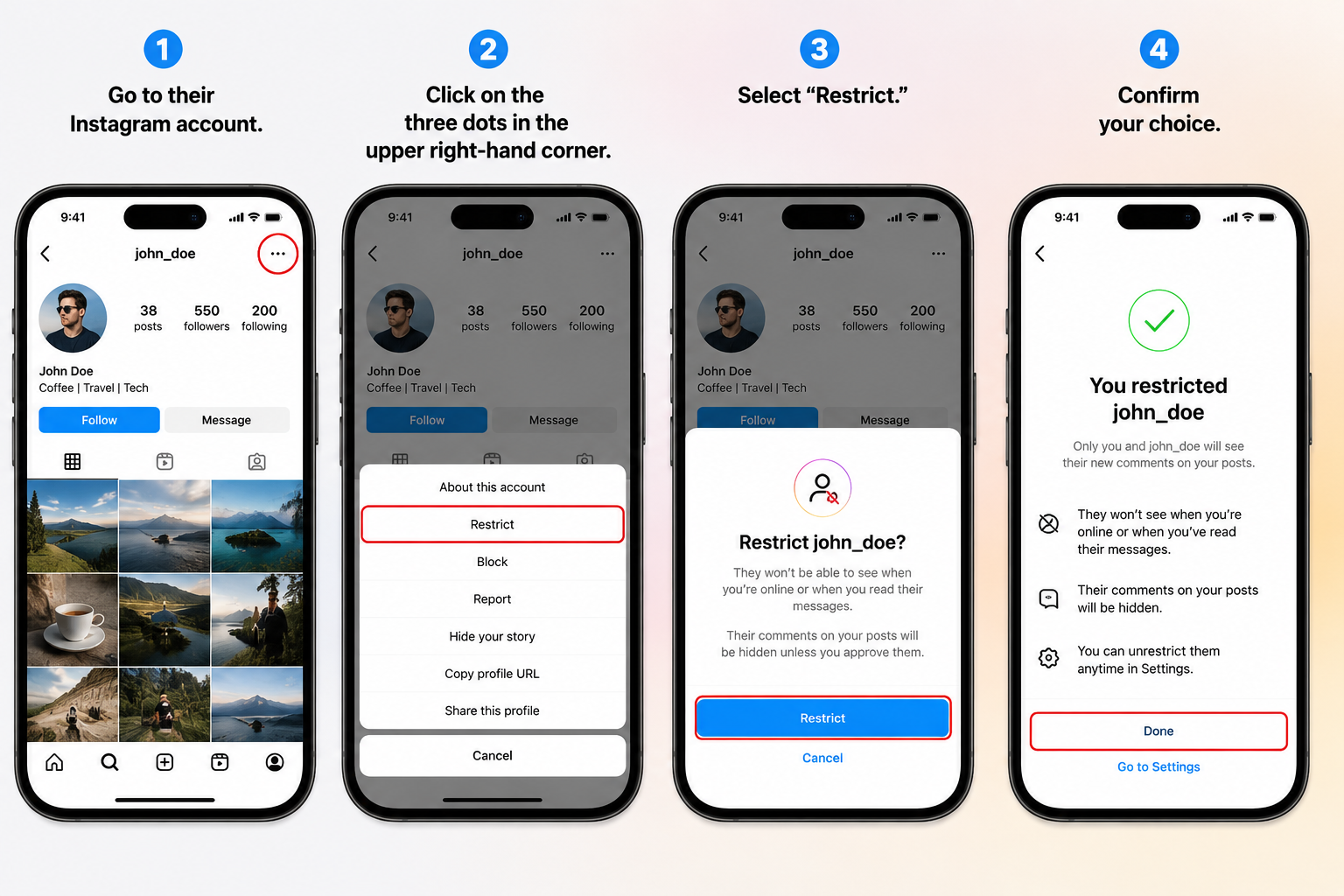
It only takes a few seconds to restrict somebody.
The restriction can be lifted at any time, following the same steps.
Blocking someone completely cuts off their access to your profile. That can be necessary in some situations, but it is not always the best option. Restrict can be a better solution.
With Restrict you can benefit in the following ways:
Restrict is a great tool for many creators and business owners who need to limit access to some of their tougher followers, but don't want to hurt their online community.
In case, If the situation gets worse and you need additional assistance in dealing with social media problems, Social media support services can offer you guidance and protection of your accounts.
The Restrict feature is most effective when a person is bothering you, but hasn't gone over the line into serious harassment.
Use Restrict when: when you want to focus on a specific element in the range.
If the abuse is serious, it might be best to either report or block the account.
Restrict is good, but it is one of many measures that should be implemented to protect an account. Along with adjusting privacy settings and security features, Instagram account verification can help establish account authenticity and reduce the risk of impersonation or unwanted activity.
Other hints and tips are:
For those who are locked out of their accounts, a professional Instagram account recovery service can help you recover your account.
For more safety tips, Instagram's official safety resources and the guidance provided by the National Cybersecurity Alliance offer useful best practices.
No, Instagram doesn't inform users of their restriction. Unless they have a reason, most of the people will not know that the feature has been added to their account.
Yes. They will still be able to see your public posts, stories and profile (unless you have restricted visibility on your account settings).
Yes, but their messages are moved to your message requests folder. They can be read without the sender being aware of it.
This will depend on the circumstances. Restricting is helpful to keep unwanted interactions to a minimum, but blocking is to deny access.
Yes. An unrestricted can be made at any time by using the profile settings.
You can take control of the situation even if you have toxic followers. Dealing with toxic followers can be frustrating, but Instagram offers tools to help. When you use the Restrict feature, you can limit unwanted interactions without causing any conflicts.
Whether you're a creator, business owner, or regular social media user, Restrict can help create a healthier social media experience. For more serious account problems, you may benefit from professional help and account protection services to keep your Instagram account safe and stress-free
.avif)



.avif)


.png)
.png)
.png)