Instagram, the world’s digital diary, is actively used by over 2 billion users.
Unfortunately, this massive number of users also intrigues malicious actors. One moment, you are scrolling, looking at cute cat videos, and the next minute, you are compromised. Even before the “oh my God! my Instagram is hacked” feeling catches up.
You see unauthorized posts, and your friends start calling you for your new post about a crypto scheme that will make one rich overnight. It’s fairly common with Meta-owned applications, with reports indicating that up to 85% of Meta accounts have been compromised at some point.
You must be thinking, "How do I know if my Instagram is hacked?" The short answer is, there are signs. Keep reading this article, as we learn to identify the said signs, explore the methods cyberattackers use, and provide actionable steps for recovery and prevention.
Before you spiral about "what to do if my Instagram account is hacked?", make sure you are actually hacked. For that, look for these common Instagram account hacked signs:
If you have noticed one of these signs on your account, don’t worry!
We can help with that as well. But before that, let’s take a look at some common ways cyberattackers use to compromise Instagram accounts.
Perhaps you clicked a suspicious link, had a weak password, used a similar password for multiple accounts, or whatever the reason was, you have found yourself in a great mishap.
Before we learn how to tackle this ‘mishap’, let’s take a brief look at some common ways used to hack Instagram accounts, so you can avoid getting yourself in the same situation again.
Getting hacked is a tragedy. It can have a profound impact on mental health. Hence, the first step is Instagram account recovery. However, it’s also important to note that only 30% of users can recover their accounts, making it critical to act as soon as possible.
If the hacker has changed the email or the password for your account, it’s relatively easy to get the hold back. Instagram usually sends two emails: one for the original email and one for the new one.
The email sent to the original address includes a button to deny the email change request. This email comes from security@mail.instagram.com.
Alternatively, you can submit a form for the Instagram support centre. This form is exclusive to users experiencing a cybersecurity situation; however, many claim they have not received a response through this method.
To submit a form, navigate to Instagram’s help centre. Accessible at www.instagram.com/hacked.
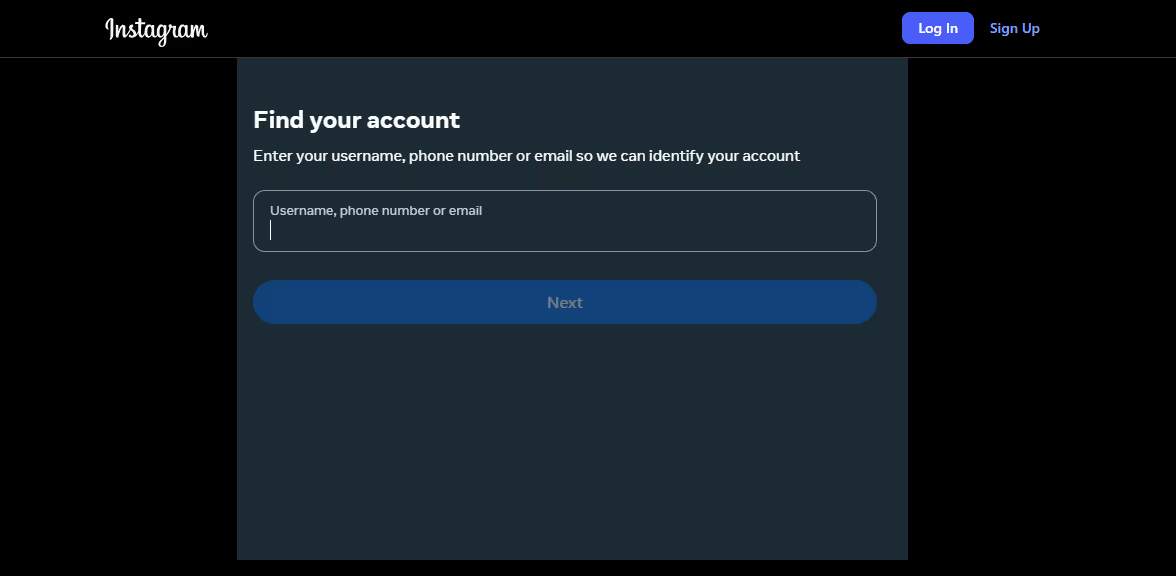
Enter your username, phone number, or email address to identify your account. You will then be taken to the help centre.
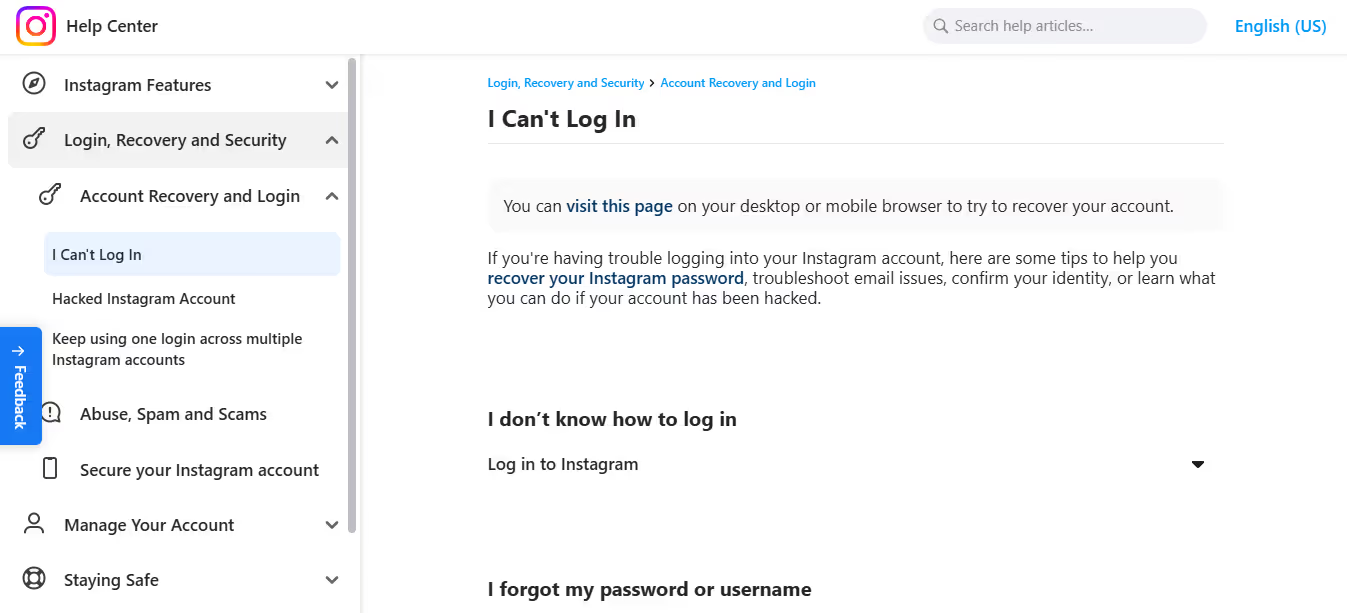
From here, you can navigate to further tips to recover your account, or you can visit the linked page…

Enter your username or email again and get a link in your email that can help you return to your account.
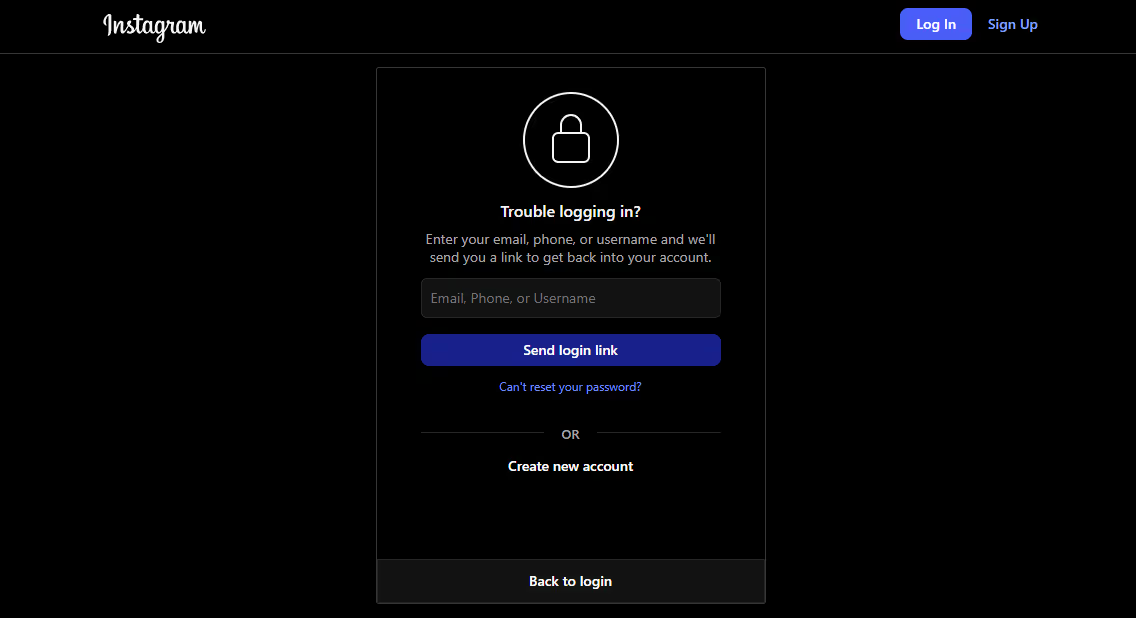
If you can’t log into your account and have the 2FA enabled, you can also submit a verification video selfie to verify your identity. To do so, log in to your account, and when you are asked for the 2FA code, select Get Support and follow the instructions to submit a video of yourself.
Although some articles claim this method to be time-consuming, cause people have waited for weeks or even months before getting a response.
As a last resort, getting your account Meta verified allows for connecting with the priority support team exclusive for verified Instagram accounts, which means celebrities, massive channels, businesses, corporations, and more.
Thus, you are more likely to get a faster and better response. Several articles and threads on popular forums claim getting their account back after applying for Meta verification, in other words, getting the blue-colored checkmark on their accounts.
If you can’t access your Instagram account, use the linked Facebook account. Navigate to Meta Suite Account ⇒ Account Centre ⇒ Show your account is verified.
Finally, add a payment method; the cost of a verification badge can vary by location, business, or whether you use the web or the application. Usually, it’s USD $11.99/month when subscribing on a web browser or $14.99/month through the app.
The easiest and most convenient way is to let professionals handle it. At Social Rescue, we offer a suite of social media services, including social media account recovery. Sit back and relax while we take care of the hectic recovery process.
If your business relies on social media presence, we are here to 'rescue.' Our experts take every case with precision and expertise, which allows for the industry-leading recovery rates—up to 99% for disabled accounts!
Moreover, we also help with username claim, social media verification, PR services, and more.
Following the given strategies can help you regain your account. However, to prevent it from happening again in the future, you need to deploy necessary safety precautions, such as:
One of the most common cyberattacks involves spreading malicious links that contain malware. This malicious practice is known as phishing. Over 90% of cyberattacks start with a phishing email.
There are two kinds of malicious links:
Over 75% people ignore best security practices when creating new passwords, even when being fully aware of the consequences. Your every password should be:
Cyberattackers deploy automated bots that use trial-and-error to crack a password open. A study by NordVPN listed the 200 most common passwords and found that common passwords can be cracked in a fraction of a second.
Every now and then, a flying news informs us of yet another data breach.
These data breaches expose billions of credentials that cyberattackers use on different applications or websites to gain unauthorized access to accounts that use similar credentials across different accounts.
This process is known as credential stuffing.
An operator of a major Content Delivery Network (CDN) reported witnessing over 193 billion such attacks back in 2020. Considering the dramatic rise in cyberattacks year by year, we can only imagine the total number of credential stuffing attacks that occurred in 2025.
You can prevent such an attack by using strong, unique passwords for every account you create on the internet.
2FA (two-factor authentication) or MFA (multi-factor authentication) is one of the greatest anti-cyberattack inventions. According to Microsoft, it blocks over 99% of automated bot attacks.
It refers to when you require another factor to authenticate the login attempt, usually via the owner’s mobile. This security practice is crucial as it can protect even when the password is leaked or hacked.
To enable the feature, go to your profile and click the three dots at the top right corner to enter settings. Go to the Accounts Center…
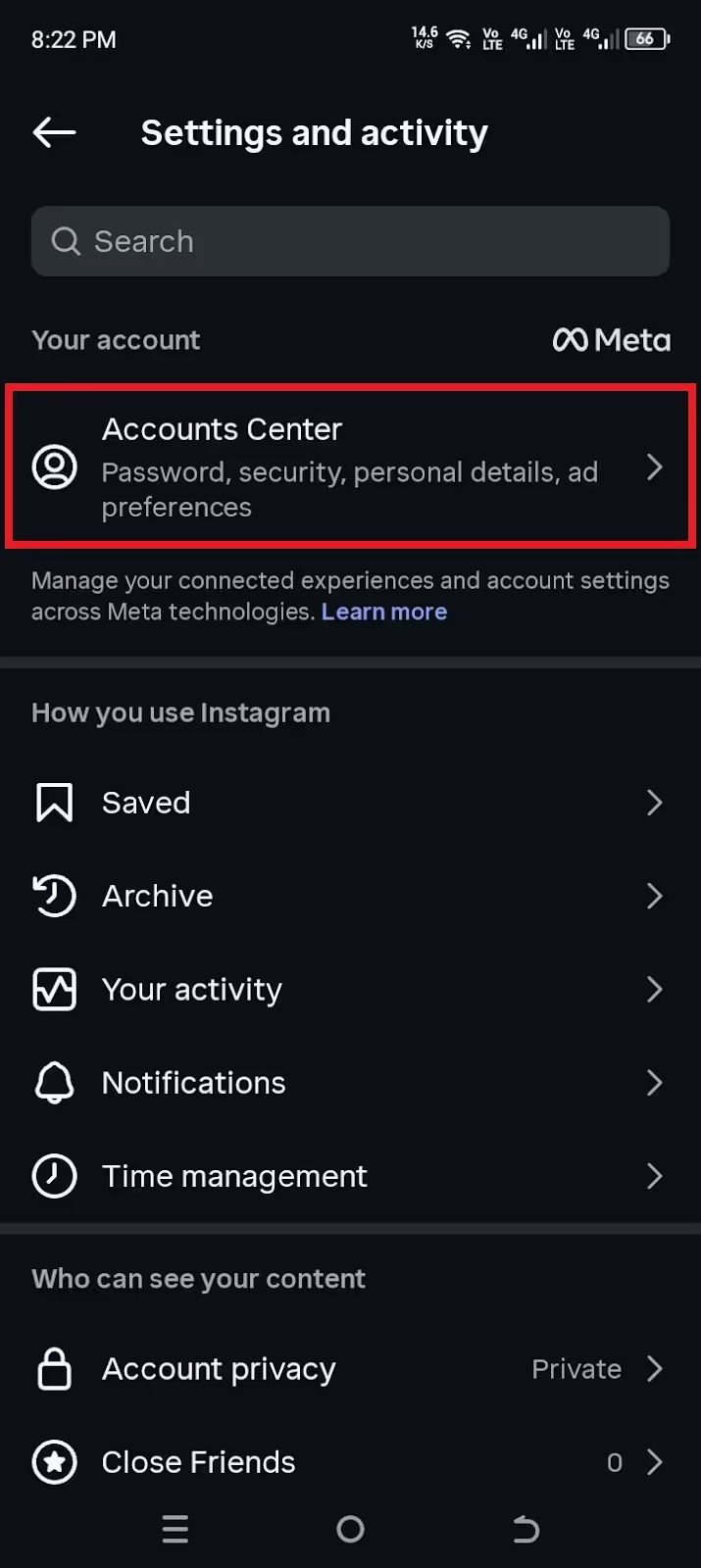
And then Two-factor authentication.
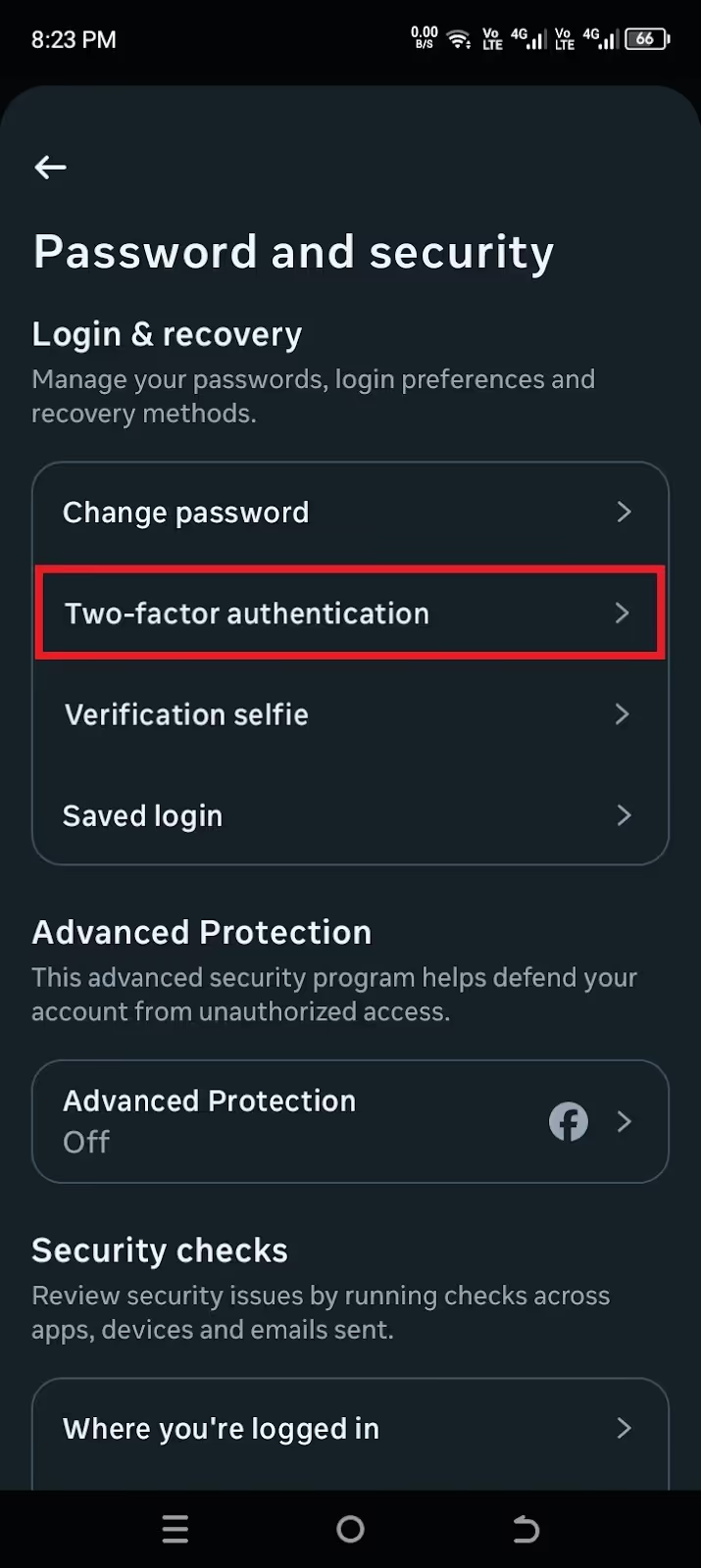
Set it up using your phone, and you just hardened your account’s security in a few taps.
60% of breaches involve exploiting a vulnerability in software that already has a security update available. It is one of the easiest ways of staying safe online, yet only 36% of users actively keep software up-to-date.
This practice should not be limited to Instagram, but the browser you use it on, Android, iOS, plugins, browser extensions, and each and every software that makes up your online experience should be running on the latest version available.
As a business, it is understandable that you may want to use external software for automation or to extend Instagram's functionality beyond what it offers by default.
In such a case, businesses turn to third-party software that may require liberty for your account. Although these tools get the work done, it’s imperative to note that you are actively dependent on the generosity of the said software’s security team.
A similar incident occurred in 2020, when Social Captain, a third-party Instagram automation service known for using AI to grow an account's follower count, was breached and exposed over 10,000 credentials.
Hence, it’s crucial to filter which application or service has the necessary permissions, and it’s also very important to revoke access to services you don’t feel the need for anymore.
Sometimes, cyberattacks are not a consequence of sophisticated hacking tools but rather a direct result of the unfiltered information we share willingly.
Oversharing minute details about one’s life can be cataloged by malicious actors. In isolation, these details may seem harmless, but together they often provide the answers needed to bypass security questions or reset a forgotten password. In this digital era, discretion is the best strategy for a secure online experience.
As we argued in the article, security breaches come with real consequences. The staggering number of active users makes Instagram a lucrative target for malicious actors.
This article outlines that, while there are recovery options, the reality is that account retrieval rates are low, making prevention undeniably superior to cure. Ultimately, security is a continuous commitment. It requires vigilance in avoiding suspicious links, adopting strong password habits, maintaining up-to-date software, and filtering permissions.
Finally, again, If you need help with TikTok, Facebook, or Instagram account recovery, Social Rescue has got you covered! We can help recover a disabled, banned, or hacked account almost always. Bid farewell to "my Instagram is hacked!" panic.
Remember, with cyberattacks evolving at an unprecedented rate, every step you take online needs to be calculated and composed. Stay vigilant and stay safe!
The most common signs include receiving an email from Instagram about a password or email change, noticing spammy posts or DMS from your account, suddenly being unable to log in, or your display name, profile picture, or biography abruptly changing.
Look for a notification from security@mail.instagram.com. If the hacker changed your email, this email includes a "Secure my account" button you should click right away to restore your account. Alternatively, you can submit a claim that would require a video verification, or you can get premium support by getting Meta verified.
Yes, you can recover a hacked Instagram account! Check your original email for a denial link from security@mail.instagram.com to revert unauthorized changes. If that fails, go Instagram’s official recovery route, which may require submitting a video selfie to verify your identity. Alternatively, get Meta verified to get access to premium support and request recovery of your account.
Malicious actors gain unauthorized access to your account. They can lock you out of your account, make changes to the profile, post spam, send malicious DMs, or potentially access linked accounts. All that poses a serious risk to your identity and to your finances.
According to Instagram, the selfie verification process for the submitted video may take up to two business days. In the meantime, you will not be able to access your account.
.avif)



.avif)


.avif)
.png)
.png)
.png)