You've made your decision; it's time to step away from TikTok. Maybe it's a digital detox, a privacy concern, or you simply want a fresh start. But here's the problem: you've spent months, maybe years, building a library of videos, saving sounds, and creating content that matters to you. The last thing you want is to wipe all of that out permanently.
If you're searching for how to delete your TikTok account without losing your content, you're not alone. Millions of users want to close their profiles but feel stuck because the process isn't exactly transparent. In this guide, we'll walk you through everything from downloading your data and deactivating your profile to knowing what happens after you hit that final delete button. Whether you're dealing with a current account or need to remove an old one, we've got you covered.
Before diving into the steps, it helps to understand why users decide to close their accounts. According to a 2024 Pew Research Center study on social media use, nearly one in five US adults has either left a social media platform or significantly reduced their usage — driven primarily by privacy concerns, time management, and mental health.
Common reasons TikTok users leave the platform include:
Whatever your reason, the most important step before removing your profile is backing up your data. Deletion on TikTok is permanent — once the 30-day window closes, your content, messages, and profile information are gone for good.
If you're facing a more complex situation, a hacked profile, a disabled account, or an unexpected removal, trusted social media support services can help you regain control before making any permanent decisions.
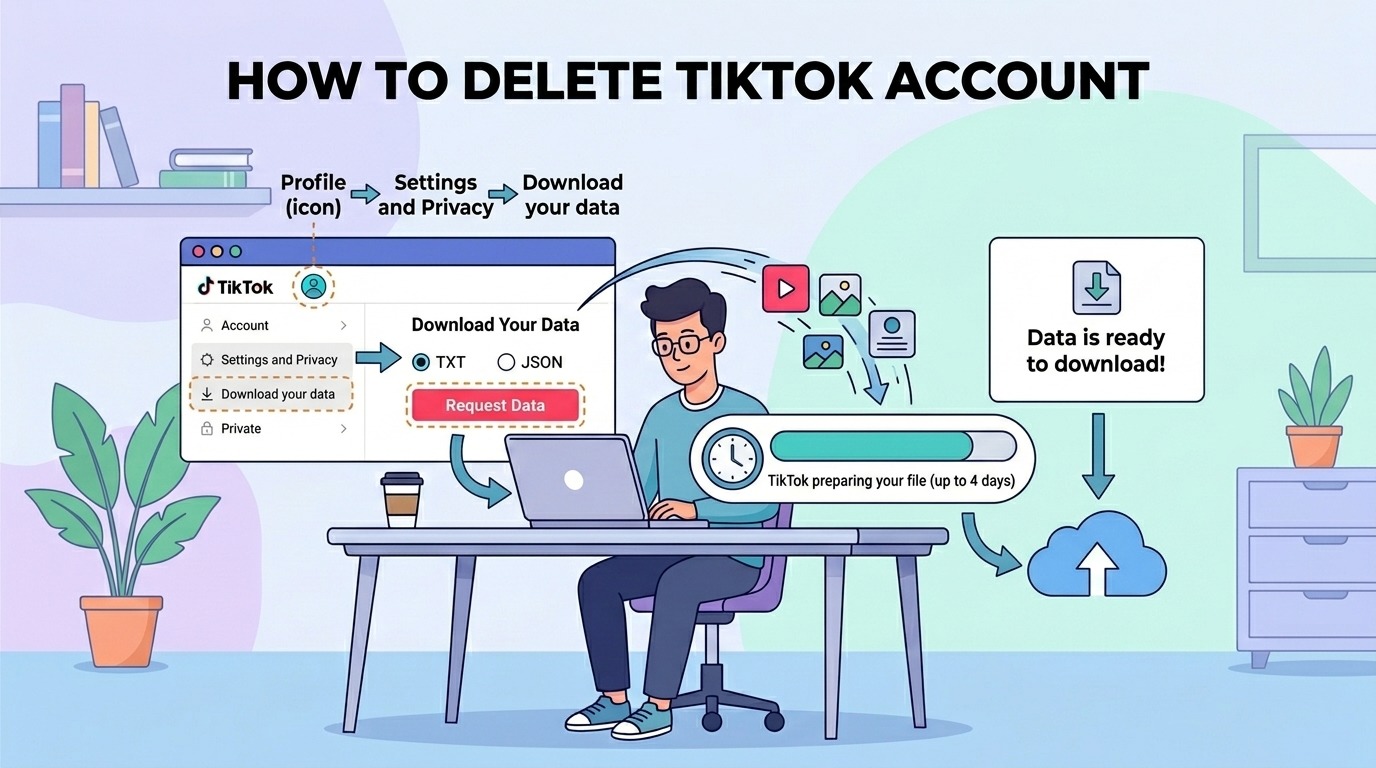
This is the most critical step — and the one most people skip. TikTok allows you to request a full data download before you close your account. This archive includes your videos, profile info, comments, direct messages, and browsing history.
Pro Tip: Download both formats if you're unsure which you'll need. The JSON format is more versatile for importing into other tools.
Your data archive will include your posted videos, but it's smart to manually save any content you want to keep or repurpose. Here's how:
If you've built a significant following or brand presence, consider archiving your profile analytics too — metrics like follower growth and video performance can be useful if you ever start a new account.
Once your data is safely backed up, you're ready to proceed. Here's the exact process to permanently remove your profile, whether you're wondering how do I delete my TikTok account from a phone or desktop.
Important: During the 30-day window, your account is deactivated but not deleted. If you log back in during this period, the deletion process is canceled automatically.
One of the trickiest situations is when you need to know how to delete an old TikTok account but no longer have access to the email, phone number, or password associated with it. Here's what you can do:
Here's a quick breakdown of what to expect once you initiate the deletion process:
One thing to note: TikTok may retain certain data for legal or regulatory compliance purposes even after account deletion, as outlined in their TikTok Privacy Policy.
If you're wondering how can I delete my TikTok account as someone under 18, the steps are largely the same. However, TikTok applies stricter privacy settings for users under 18 by default, including restricted messaging and private-only accounts for those under 16. Parents or guardians can also request account removal via TikTok's Family Pairing feature or by submitting a request through TikTok's Privacy Request form.
If you're not 100% sure you want to leave TikTok forever, consider deactivating rather than deleting. Here's the difference:
Deactivation (Temporary):
Permanent Deletion:
Once the 30-day deactivation window closes, permanent deletion is irreversible and TikTok cannot restore your account or data. However, if you're still within the 30-day grace period, you can cancel deletion simply by logging back in. If you believe your account was wrongfully deleted or you've lost access, a specialist recovery service may be able to assist before the window closes.
TikTok will remove your publicly visible content, profile, and most associated data after the 30-day deletion window. However, TikTok's privacy policy states that certain data may be retained for legal, safety, or regulatory purposes for a limited period after closure. Downloading your data before deletion ensures you retain a personal copy of everything.
After you initiate account removal, TikTok begins a 30-day deactivation period. During this time, your profile is hidden but not yet permanently removed. After the 30 days, deletion is completed and all associated content and data are erased from TikTok's platform. The entire process takes approximately 30–45 days to complete fully.
Once your account is permanently deleted after the 30-day deactivation period, your username is released and becomes available for other users to claim. If your username is part of your personal brand or business identity, be aware that someone else may register it after you delete. Consider this carefully before proceeding.
Yes — you can initiate account deletion through TikTok's desktop website (tiktok.com) even if you're unable to access the mobile app. However, if you are fully locked out and cannot log in via any method, you'll need to first recover account access through TikTok's support channels or a professional recovery service before you can proceed with deletion.
Removing your TikTok presence doesn't have to mean losing your content and memories. By downloading your data first, manually saving key videos, and following the proper step-by-step process, you can exit the platform on your own terms, with everything you care about safely backed up.
If you're locked out of an old account or dealing with a more complex access issue, don't attempt to rush the process or risk losing recoverable data. Specialist support can make all the difference when standard platform tools fall short. Whether you need help getting back in before you close up for good, or you simply want guidance navigating the process, Social Rescue is here to help, explore your options through our TikTok account recovery service today.
Ready to take control of your social media presence? Start with a full data download — then decide your next move with confidence.
.avif)



.avif)


.jpg)
.png)
.png)
.png)