Before we go further, quick terminology check, because Instagram has two different "names" and people mix them up constantly.
Your username (also called your handle) is the @whatever that appears in your profile URL. That's what people type to find you, tag you, or send you a direct link. Example: @socialrescue
Your display name is the bold text at the top of your profile. The one that doesn't need to be unique and can include spaces, emojis, whatever. Example: "Social Rescue | Account Recovery"
When most people ask "how to change Instagram name," they're usually talking about the username. That's the one that feels risky to change because it affects how people find you. The display name? You can change that anytime with basically zero consequences. Nobody's getting confused if your display name shifts from "Sam's Bakery" to "Sam's Artisan Bakery."
This post focuses on changing your username (the actual handle) because that's where all the anxiety lives.
This is the big one. When you change IG handle, Instagram doesn't boot anyone off your follower list. Your audience count stays the same. The people who followed you yesterday will still follow you tomorrow; they just see a different username attached to your account.
Instagram treats username changes as a cosmetic update to your profile, not a new account creation. All your posts, stories, highlights, DMs, everything? It all stays intact and connected to the same account. Just under a new name.
Here's where it gets a little tricky. The second you change your username, your old one is released back into the pool. Anyone can claim it (including competitors, impersonators, or random people who happen to like that handle).
We've seen this cause real problems for businesses. You rebrand from @johnsplumbingservice to @johnsplumbing, and within an hour someone else snaps up @johnsplumbingservice and starts posting weird stuff. Now confused customers are messaging the wrong account, and you're dealing with a mess you didn't need.
If your old username has any value (if people know it, if it's tied to your brand at all), consider protecting it. Some businesses create a placeholder account with their old handle just to keep it off the market. Others use Instagram's instagram username claim services if someone else grabbed it and they need it back.
Every URL that included your old username stops working the moment you change it. Business cards with your Instagram handle printed on them?
According to Hootsuite's research on Instagram profile optimization, broken profile links are one of the most common (and avoidable) mistakes businesses make during rebrands. The fix is straightforward but requires some legwork: you need to update every place your old handle appears. Bios, websites, email signatures, printed materials, partner pages, everywhere.
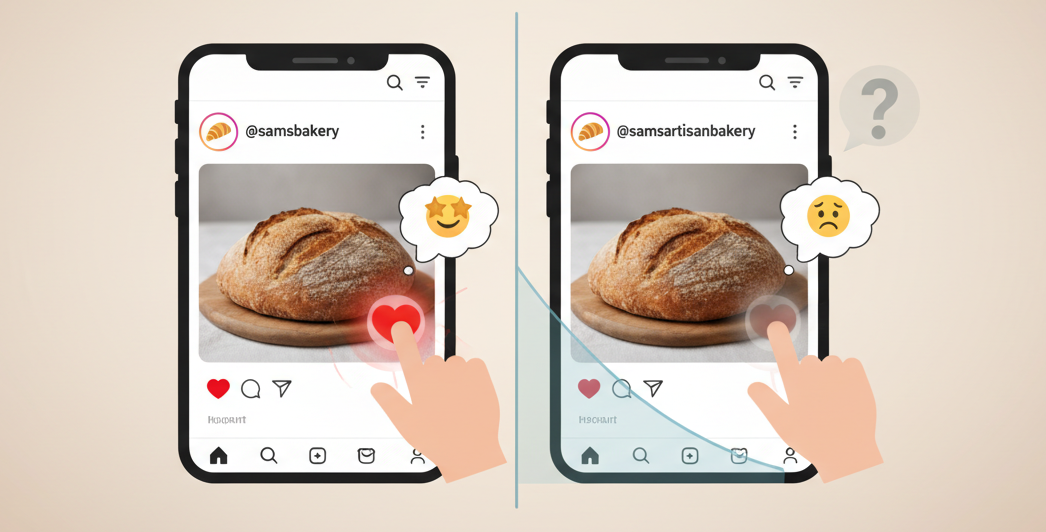
Your follower count will survive an Instagram name change just fine. The actual risk is momentum loss from audience confusion.
Think about it from your followers' perspective. They followed @samsbakery. They scroll past dozens of accounts every day, barely paying attention to usernames. Then one day, a post shows up from @samsartisanbakery. Do they recognize it immediately? Maybe. Or maybe they scroll past it thinking "who's this?" and your engagement drops because people aren't registering that it's you.
This is especially true if your username was closely tied to your brand identity. If people knew you as @samsbakery and recommended you to friends using that exact handle, changing it creates friction. Not impossible friction, but friction nonetheless.
Here's what we've seen work to minimize confusion:
Post about the change multiple times before it happens. Don't just announce it once in a caption. Put it in stories. Pin a post about it. Make it impossible to miss if someone's paying even slight attention to your account. Give people a week or two of lead time so the new name sinks in before the switch actually happens.
Update your display name and bio simultaneously. When you make the username change, also update your profile to reinforce who you are. Your bio should make it crystal clear this is still the same account they've been following. Something like "Formerly @samsbakery | Same recipes, new name" for a month or two makes a huge difference.
Keep visual branding consistent. Don't change your profile picture at the same time you change your username. Don't overhaul your content style. Keep everything else stable so people have visual anchors to recognize you even if the handle changed.
The mechanical part is straightforward. Here's the actual process to change IG name:
Open Instagram and go to your profile
Tap "Edit Profile"
Tap the "Username" field
Type your new username (Instagram will tell you immediately if it's available)
Hit "Done" and confirm the change
That's it. Takes about 30 seconds. The username changes instantly across the platform.
A few technical notes worth knowing:
Instagram usernames can only include letters, numbers, periods, and underscores. No spaces, no special characters. They have to be unique (obviously), and they're not case-sensitive, so @SocialRescue and @socialrescue are treated as the same thing.
You can only change your username twice within 14 days. Instagram puts this limit in place to prevent abuse and impersonation. So if you change it, regret it immediately, and want to switch back? You can, but then you're locked for two weeks. Plan accordingly.
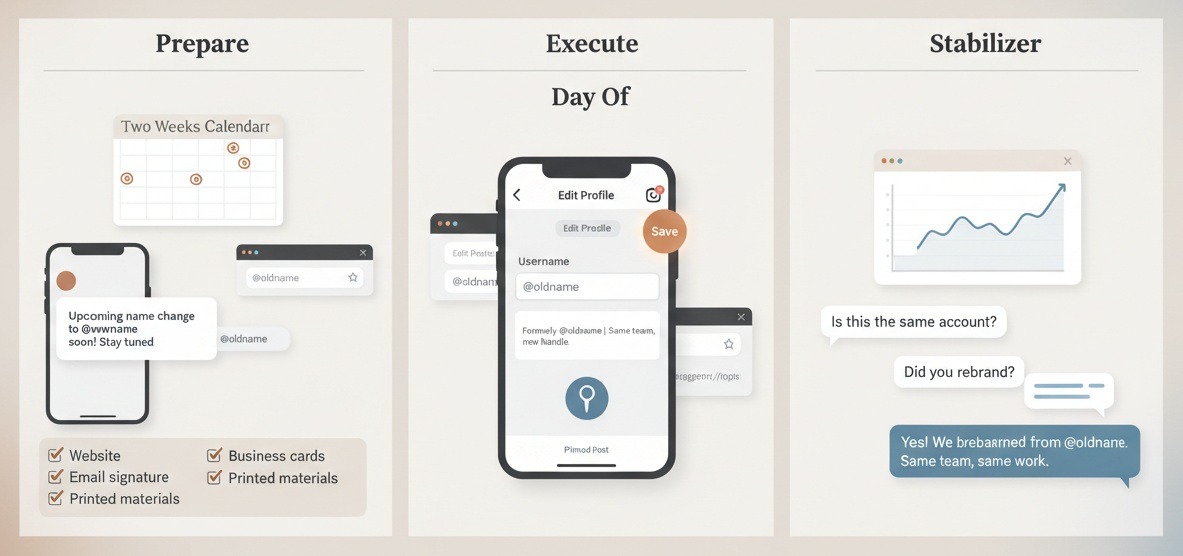
Give your audience advance warning. Post about the upcoming username change multiple times. Put it in your bio. Mention it in stories. Get ahead of the confusion before it starts.
Start updating external assets now, not after the switch. Update your website, business cards, email signatures, printed materials, anywhere your Instagram handle appears. If you can swap them out before the change happens, even better.
Pick a time when you can spend 30 minutes focused just on this. Change the username, then immediately update your bio and display name to reinforce the change. Pin a post explaining the rebrand. Update your story highlights if your old username appears anywhere.
Double-check that the change actually went through. Occasionally Instagram glitches and doesn't save it properly. Open your profile in a browser and make sure the new URL works.
Watch your analytics for the next week or two. If engagement drops noticeably, you might need to post more frequently to stay visible, or remind your audience more explicitly that it's still you.
Answer questions in DMs and comments. Some people will be confused. That's fine. Just be responsive and clear about what happened. "Hey! Yep, we rebranded from @oldname. Same team, same work, just a new handle" goes a long way.
Here's something most articles about Instagram name changes don't mention: sometimes the change itself isn't the problem. The problem is what happens after.
You change your username, everything seems fine, then a week later you're locked out of your account for seemingly no reason. Or someone reports your new username as impersonation because they don't realize you rebranded. Or your old username gets claimed by a bot account that starts DMing your customers.
If any of that happens, Social media support services specialize in exactly these situations. We handle username disputes, account access issues, verification appeals, and pretty much any Instagram problem that makes you want to throw your phone out a window. Worth bookmarking before you need it.
FAQ: Everything Else You're Probably Wondering
Can I change my Instagram name without losing followers?
Yes. Changing your username doesn't remove anyone from your follower list; your audience stays exactly the same. What you might lose is engagement temporarily if followers don't recognize your new handle right away, but your actual follower count won't drop just because you changed the name.
How often can I change my Instagram username?
Instagram allows you to change your username twice within any 14-day period. After two changes, you'll need to wait until 14 days have passed from your first change before you can update it again. This limit is in place to prevent spam and impersonation.
Will my old Instagram username be taken by someone else?
Yes, your old username becomes available immediately after you change it. Anyone can claim it within seconds (competitors, impersonators, or random users). If you want to keep your old handle from being used, you'll need to create a placeholder account with that username or use an Instagram username claim service.
Do verified accounts lose their verification badge when they change usernames?
Generally no, but Instagram reviews username changes for verified accounts. If your new username drastically changes your brand identity or violates verification policies, Instagram might remove the badge and require you to reapply. Minor changes like abbreviations or simplified spellings typically don't affect verification status.
What happens to tags, mentions, and DMs after I change my Instagram name?
All existing tags, mentions, and direct messages automatically update to show your new username. Old tags in other people's posts will display your new handle, and DM conversations stay intact with the updated name. However, any @mentions of your old username typed in new posts after your change won't notify you; those now point to whoever claimed your old handle.
Here's the thing about Instagram username changes: they're not nearly as catastrophic as people fear, but they're also not completely risk-free. The platform makes it technically easy to switch your handle, but that doesn't mean there aren't consequences if you do it carelessly.
If you're rebranding, simplifying, or fixing a username that's been holding you back, go for it. Just give your audience advance warning, update your external links before the switch (not after), and keep everything else about your account consistent so people can still recognize you.
And if your old username matters, protect it before you let it go. Once it's out there, getting it back is significantly harder than just keeping it in the first place.
Need help figuring out if a username change makes sense for your situation? Or dealing with the aftermath of one that went sideways? That's exactly what we do.
.avif)



.avif)


.png)
.png)
.png)